

1. Introduction
Fishing effort refers to the amount of work or resources invested in fishing, usually measured by factors like the number of fishing vessels, fishing gear, hours spent, and number of fishermen involved. It is a central concept in fisheries management because it directly affects fish populations, ecosystem balance, and the productivity of fisheries.
1.1. Benefits of Fishing Effort
- Supports Sustainable Fisheries Management: Tracking fishing effort allows managers to regulate activity levels, preventing overfishing and helping maintain healthy fish stocks for long-term community benefits.
- Boosts Economic Stability: Controlled fishing effort creates a steady fish supply, supporting local economies, providing jobs, and preventing the harmful cycles of overexploitation.
- Preserves Marine Ecosystems and Biodiversity: Managing fishing effort reduces habitat damage, bycatch, and imbalances in marine life, supporting biodiversity and ecosystem health.
- Ensures Compliance with Regulations: Fishing effort data aids in enforcing quotas and seasonal closures, ensuring fishers follow guidelines to protect resources.
- Encourages Technological Advancements: Managed fishing effort drives innovation, leading to more efficient, eco-friendly gear and practices, minimizing waste and maximizing catch.
- Aids Scientific Research and Stock Assessment: Fishing effort data helps scientists estimate fish populations, guiding sustainable management and adapting to environmental changes.
2. BlueSenz API
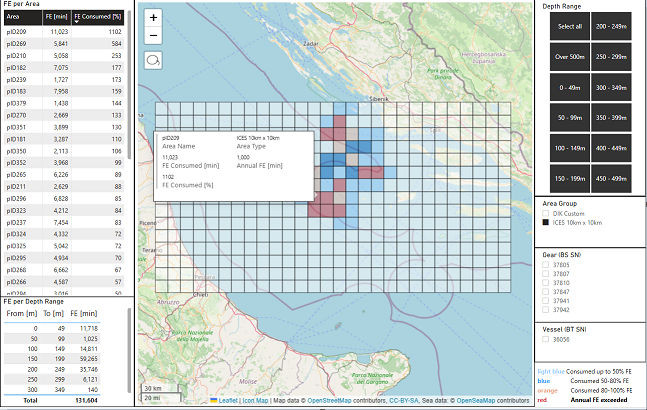
BlueTraker offers an API specifically designed to assist with detecting Gear Soak Time and calculating Fishing Effort. BlueTraker’s API provides automated, real-time insights by leveraging data from vessel tracking and advanced monitoring systems. This API can be highly beneficial for those in the fishing industry, as well as fisheries managers and researchers, by accurately tracking and analyzing critical fishing activities, such as:
- Gear Soak Time Detection: BlueTraker’s API can monitor and detect when fishing gear is deployed (soaked) and retrieved, allowing for precise calculation of the time gear spends actively fishing.
- Fishing Effort Analysis: By using position reports and other tracking data, BlueTraker's API can calculate various fishing effort metrics. This includes soak duration, intensity of effort based on location and area fished, and tracking of fishing pressure in specific zones.
This API helps enhance compliance, optimize fishing practices, and support sustainable fishing efforts by providing users with a comprehensive overview of their fishing activity in real-time. For more details, you can contact BlueTraker or explore their documentation to understand the specific API endpoints and usage examples available for Gear Soak and fishing effort tracking.
2.1. What is an API
An API is a set of protocols for building and integrating software, acting as a contract between an information provider and user. Essentially, an API lets users interact with a system to retrieve data or perform actions. It acts as a mediator between clients and the services they access, allowing secure, controlled, and authenticated data sharing.
Additionally, APIs handle data retrieval without requiring users to know technical details like caching.
2.2. REST API
REST is a flexible set of architectural constraints for building APIs, not a strict protocol. It allows API developers to transfer resource data over HTTP in formats like JSON, which is widely used due to its language-neutral and human-readable nature.
RESTful APIs rely on HTTP methods, using headers and parameters to provide essential information such as metadata, authorization, and URIs. For an API to be RESTful, it must meet these criteria:
- Client-server architecture with requests via HTTP.
- Stateless interactions, where each request is independent.
- Cacheable data to improve efficiency.
- Uniform interface for standardized data transfer, allowing clients to manipulate resources via representations, receive self-descriptive messages, and access further actions via hyperlinks.
- Layered system for organizing servers in hierarchies.
- Optional code-on-demand to send executable code to the client if needed.
Unlike the strict SOAP protocol, REST’s guidelines offer a lightweight, scalable approach, ideal for IoT and mobile applications.
2.3. Authentication
Token-based authentication is a security mechanism widely used in RESTful APIs to verify the identity of a user or application. Unlike traditional methods that rely on sessions and cookies, token-based authentication provides a stateless and scalable way of ensuring secure access to resources across distributed systems and mobile applications.
Token-based authentication is widely used in modern web applications, especially single-page applications (SPAs) and microservices, where traditional session-based authentication would be inefficient. By implementing token-based authentication, developers can create secure, stateless APIs that can scale and adapt to various client types and usage scenarios.
Our Team will provide you with needed credentials to start using API
3. API methods
3.1. Authentication API
An Authentication API is used to verify a user's identity so that only authorized users can access certain parts of an application or system. Token Auth is used for
3.1.1. GetAccessToken
Desciption
GetAccessToken is a function or API endpoint that retrieves an access token, which is used for authenticating and authorizing access to a protected resource or service. Typically, this is part of an authentication flow, where the access token is issued after validating the user's credentials or authorization. The token grants the user or system permission to make authorized API calls for a specific duration or set of actions.
Request parmateres
| Name | Type | Mandatory/Optional | Description |
|---|---|---|---|
| password | String | Mandatory | User's password |
| userName | String | Mandatory | User's username |
{
  "password": "{{password}}",
  "userName": "{{userName}}"
}
Response
{
    "data": {
        "accessToken": "eyJ0eXAiOiJKV1QiLCJhbGciOiJIUzI1NiJ9.eyJ1bmlxdWVfbmFtZSI6IkVNQS9lbWFfYXBpX3VzZXIiLCJuYW1laWQiOiIyY2JmMzhlN2E2ZGI0NTA2YTQzZmFjZDg2MmM3M2NhNyIsInVzcl9pZCI6IjJjYmYzOGU3YTZkYjQ1MDZhNDNmYWNkODYyYzczY2E3IiwiaXNzIjoiaHR0cHM6Ly9sb2NhbGhvc3Q6OTAvc3NvYXV0aCIsImF1ZCI6IjkyZTE2NDI4MzQxMTQ0ZWRiMmQ1ZTg3MWQyMWE4NDk3IiwiZXhwIjoxNzMxNDAwOTUzLCJuYmYiOjE3MzEzOTkxNTN9.wQ62LE8NCgPeMheQ03iohKMc4MzqhbMIPnvwcSPfrZ0",
        "accessTokenexpireOn": "2024-11-12T08:42:33.000Z",
        "userName": "ema_api_user",

    },
    "message": "Success",
    "exception": false,
    "code": 0
}
3.2. BlueSenz API
3.2.1. GetPositionReports
Description
This method return all position reports per any detected net sent event. This results to every detected depth event will be equiped with GPS location.
Request parmateres
| Name | Type | Mandatory/Optional | Description |
|---|---|---|---|
| FromDate | String | Mandatory | From date filter |
| ToDate | String | Mandatory | To date filter |
Response
{
  "isSuccessful": true,
  "message": "string",
  "data": [
    {
      "fromDate": "2025-05-12T06:45:53.981Z",
      "toDate": "2025-05-12T06:45:53.981Z",
      "numberOfPositionReport": 0,
      "positionReports": [
        {
          "fishingOperationId": 324,
          "senzorSerialNumber": 12345,
          "gpsPositionTime": "2025-05-12T06:45:53.981Z",
          "longitude": 12.5,
          "latitude": 54.6,
          "heading": 345,
          "speedKn": 1.5,
          "temperature": 16,
          "depth": 234
        }
      ]
    }
  ]
}
3.2.2. GetPositionReportsPerSenzor
Description
This method return all position reports per any detected net sent event. This results to every detected depth event will be equiped with GPS location.
Request parameters
| Name | Type | Mandatory/Optional | Description |
|---|---|---|---|
| FromDate | String | Mandatory | From date filter |
| ToDate | String | Mandatory | To date filter |
| NetSenzSerialNumber | long | Mandatory | NetSenz serial number |
Response
{
  "isSuccessful": true,
  "message": "string",
  "data": [
    {
      "fromDate": "2025-05-12T06:45:53.981Z",
      "toDate": "2025-05-12T06:45:53.981Z",
      "numberOfPositionReport": 0,
      "positionReports": [
        {
          "fishingOperationId": 324,
          "senzorSerialNumber": 12345,
          "gpsPositionTime": "2025-05-12T06:45:53.981Z",
          "longitude": 12.5,
          "latitude": 54.6,
          "heading": 345,
          "speedKn": 1.5,
          "temperature": 16,
          "depth": 234
        }
      ]
    }
  ]
}
3.2.3. GetSenzorsList
Description
This method provides all netsenz serial number in your fleet.
Request parameters
/
Response
{
  "isSuccessful": true,
  "message": null,
  "data": [
    37849,
    37850,
    37931,
    37932,
    37934,
    37947,
    37946,
    38161,
    37939
  ]
}
3.3. Fishing Effort API
3.3.1. GetFishingEffort
Description
GetFishingEffort is a function or API endpoint that retrieves general fishing effort data without filtering by specific parameters like depth, area, or sensor. It typically provides aggregated information such as total fishing hours, number of trips, or gear usage over a specified time period. This endpoint offers a broad overview of fishing activity, useful for high-level monitoring, reporting, and trend analysis in fisheries management.
Request parameters
| Name | Type | Mandatory/Optional | Description |
|---|---|---|---|
| FromDate | String | Mandatory | From date filter |
| ToDate | String | Mandatory | To date filter |
| NetSenzSerialNumber | long | Mandatory | NetSenz serial number |
Response
{
  "isSuccessful": true,
  "message": null,
  "data": [
    {
      "senzorSerialNumber": 37939,
      "areaId": 110198,
      "depthProfileId": 3,
      "gearSoakTime": 608,
      "depthProfileName": "100 - 149m",
      "areaName": "ICES_Greece_Subdivision3 435"
    },
  ]
}
3.3.2. GetFishingEffortBySenzor
Description
GetFishingEffortByNetSenzSenzor is a function or API endpoint that retrieves fishing effort data based on information collected from NetSenz sensors. These sensors are typically attached to fishing gear and provide detailed, sensor-based measurements such as gear deployment duration, depth, and movement. The endpoint helps in accurately quantifying fishing activity and gear usage, improving monitoring, compliance, and data-driven fisheries management.
Request parameters
| Name | Type | Mandatory/Optional | Description |
|---|---|---|---|
| FromDate | String | Mandatory | From date filter |
| ToDate | String | Mandatory | To date filter |
| NetSenzSerialNumber | long | Mandatory | NetSenz serial number |
Response
{
  "isSuccessful": true,
  "message": null,
  "data": [
    {
      "senzorSerialNumber": 37939,
      "areaId": 110198,
      "depthProfileId": 3,
      "gearSoakTime": 608,
      "depthProfileName": "100 - 149m",
      "areaName": "ICES_Greece_Subdivision3 435"
    },
  ]
}
3.3.3. GetFishingEffortByArea
Description
GetFishingEffortByArea is a function or API endpoint that retrieves data on fishing effort categorized by geographic area. It typically provides information such as the intensity or frequency of fishing activities (e.g., vessel hours, gear types, or catch data) within defined spatial regions. This helps in assessing spatial distribution of fishing pressure, aiding in regional fisheries management and conservation planning.
Request parameters
| Name | Type | Mandatory/Optional | Description |
|---|---|---|---|
| FromDate | String | Mandatory | From date filter |
| ToDate | String | Mandatory | To date filter |
| AreaId | long | Mandatory | NetSenz serial number |
Response
{
  "isSuccessful": true,
  "message": null,
  "data": [
    {
      "senzorSerialNumber": 37939,
      "areaId": 110198,
      "depthProfileId": 3,
      "gearSoakTime": 608,
      "depthProfileName": "100 - 149m",
      "areaName": "ICES_Greece_Subdivision3 435"
    },
  ]
}
3.3.4. GetFishingEffortByDepth
Description
GetFishingEffortByDepth is a function or API endpoint that retrieves data on fishing effort categorized by depth. It typically provides information such as the amount of fishing activity (e.g., hours fished, number of vessels, gear used) across various depth ranges. This data helps analyze how fishing pressure varies with ocean depth, supporting resource management and ecosystem impact assessments.
Request parameters
| Name | Type | Mandatory/Optional | Description |
|---|---|---|---|
| FromDate | String | Mandatory | From date filter |
| ToDate | String | Mandatory | To date filter |
| DepthId | long | Mandatory | NetSenz serial number |
Response
{
  "isSuccessful": true,
  "message": null,
  "data": [
    {
      "senzorSerialNumber": 37939,
      "areaId": 110198,
      "depthProfileId": 3,
      "gearSoakTime": 608,
      "depthProfileName": "100 - 149m",
      "areaName": "ICES_Greece_Subdivision3 435"
    },
  ]
}
3.3.5. GetAssignedAreas
Description
GetAssignedAreas is a function or API endpoint that retrieves a list of geographic areas assigned to a specific vessel, user, or fishing operation. These areas typically define where fishing activities are permitted or planned, based on regulations, licenses, or management zones. The endpoint supports monitoring compliance, planning fishing routes, and enforcing spatial fishing restrictions.
Request parameters
/
Response
{
  "isSuccessful": true,
  "message": null,
  "data": [
    {
    "id": 1,
    "areaName": "DIK Area",
    "areaPolygon": [
      {
        "latitude": 43.5764114,
        "longitude": 15.5072021
      },
      {
        "latitude": 43.444943,
        "longitude": 14.8205566
      },
      {
        "latitude": 43.2371994,
        "longitude": 14.3920898
      },
      {
        "latitude": 42.8840147,
        "longitude": 14.364624
      },
      {
        "latitude": 42.6016199,
        "longitude": 14.6502686
      },
      {
        "latitude": 42.4194014,
        "longitude": 15.1226807
      },
      {
        "latitude": 42.4234565,
        "longitude": 15.6884766
      },
      {
        "latitude": 42.7308743,
        "longitude": 15.8972168
      },
      {
        "latitude": 43.0006299,
        "longitude": 15.9191895
      },
      {
        "latitude": 43.5166885,
        "longitude": 15.6939697
      },
      {
        "latitude": 43.5764114,
        "longitude": 15.5072021
      }
    ]
  },
  ]
}
3.3.6. GetDepthProfiles
Description
GetDepthProfiles is a function or API endpoint that retrieves depth-related profile data, typically collected from fishing gear or environmental sensors. This data may include measurements such as depth over time, temperature, and pressure, helping to analyze gear behavior, fishing patterns, or environmental conditions at various depths. It is valuable for understanding how fishing operations interact with different water column layers and marine habitats.
Request parameters
/
Response
{
  "isSuccessful": true,
  "message": null,
  "data": [
    {
     {
      "id": 0,
      "name": "Over 500m",
      "minDepth": 500,
      "maxDepth": 100000
    },
    {
      "id": 1,
      "name": "0 - 49m",
      "minDepth": 0,
      "maxDepth": 49
    },
    {
      "id": 2,
      "name": "50 - 99m",
      "minDepth": 50,
      "maxDepth": 99
    },
  ]
}